


Get in touch
Stay informed
Receive monthly updates on trends, products and growth insights in your inbox.




Google’s Universal Cart is now live for US shoppers, and it changes where baskets get built and where sales get won. This FAQ-style article answers the questions retailers are asking most: How it works, how a merchant gets live, what carries over from your own commerce stack and what it takes for an enterprise to do it properly.
Google’s Universal Cart is a shopping cart built into Google’s AI shopping experiences (Search, AI Mode and Gemini). Shoppers can discover products and build a basket there, then either transfer the cart to the retailer’s website or check out directly in Google. It runs on the Universal Commerce Protocol (UCP), and Google decides which merchants can take part. Google launched it in the United States on October 15, 2026.
In a nutshell, one cart can hold products from multiple retailers and follows the shopper between Search and Gemini, so an item saved in AI Mode can be picked up later in the Gemini app. The cart also surfaces promo codes, card perks and price-drop alerts.
The Universal Commerce Protocol (UCP) is an open standard that lets AI agents, businesses and payment providers talk to each other and complete purchases, from product discovery through checkout and post-purchase. Instead of building one integration per AI agent, a merchant publishes a UCP profile and declares the capabilities it supports.
In short, UCP is the underlying standard that powers Universal Cart.
For how commercetools approaches it, see our merchant guide to Google’s UCP and the Google module documentation.
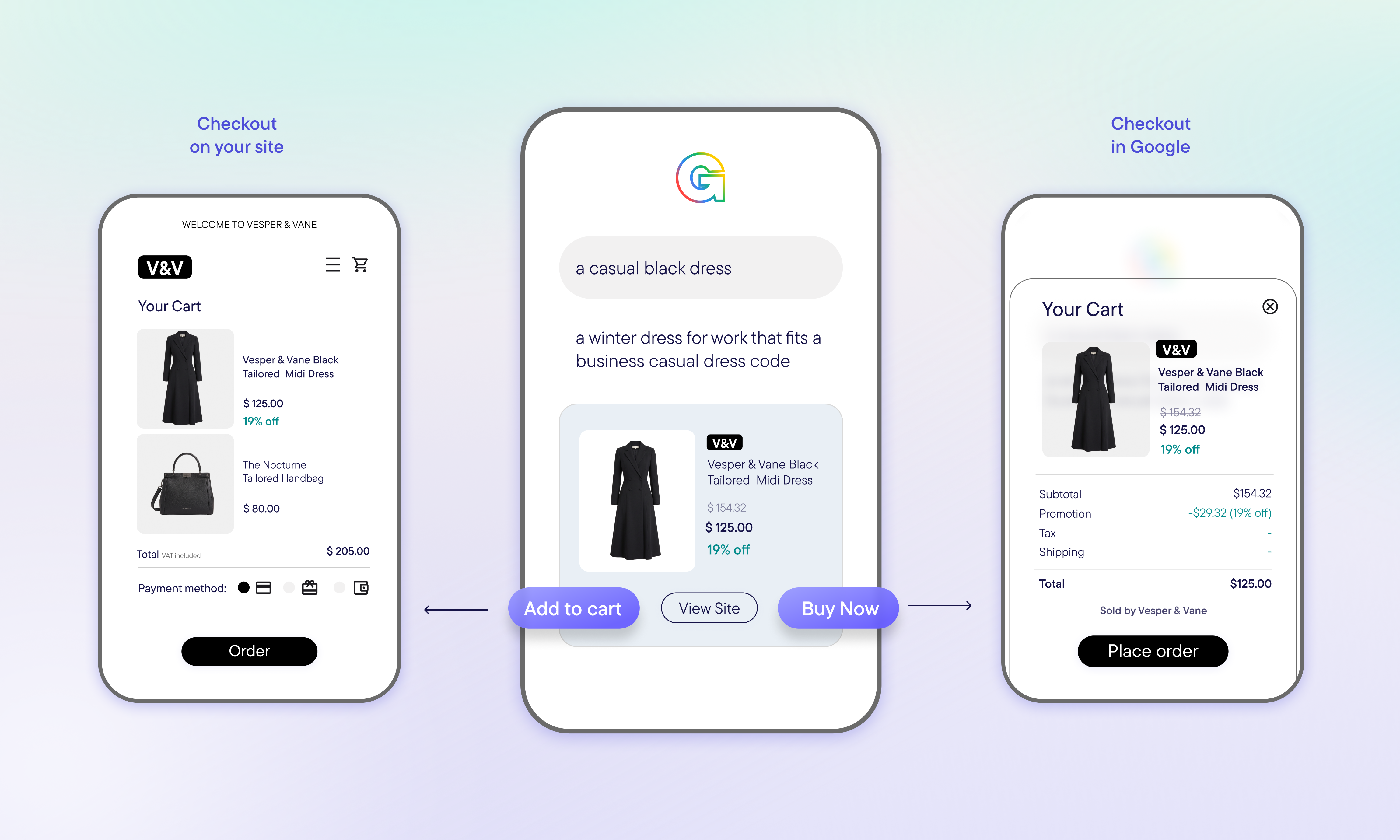
For a retailer, Universal Cart is a way for shoppers to reach your checkout or complete a purchase with you from a cart they built across Google’s AI surfaces. It provides two paths:
Universal Cart transfer. The shopper builds a basket in Google, then continues to the merchant’s website with the basket pre-filled. You keep your own checkout, payment options, cross-sell and upsell, abandoned-cart retargeting and loyalty experience. It runs on the UCP cart API. Google’s current cart API supports only creation and transfer, and it is a one-way handoff: Changes on your side after the transfer don’t flow back to Google’s cart.
Native checkout. The shopper completes the purchase inside Google without visiting the merchant’s site. You implement three core REST endpoints (create, update and complete a checkout session), support Google Pay payment tokens, and send order lifecycle updates back to Google. Native checkout is a separate integration and isn’t required for Universal Cart transfer.
In both cases, the merchant remains the seller of record.
The path you choose — Universal Cart transfer or native checkout — will determine how your checkout will work with Google’s Universal Cart.
With Universal Cart transfer, the shopper clicks through, lands on your site with the basket in your cart, and checks out in your existing flow with your payment methods, tax and shipping logic.
With native checkout, the flow follows the UCP specification:
1. Google creates a checkout session with the line items and buyer details. Your system creates a cart and returns pricing.
2. Google sends updates (shipping address, fulfillment choice). Your system recalculates totals, tax and shipping.
3. Google sends the Google Pay token. Your system authorizes payment through your payment service provider and creates the order.
4. You push order lifecycle events (created, shipped, canceled) back to Google.
Your PSP must be able to process Google Pay tokens. In commercetools, the Checkout component creates the cart and the order in your Project, so orders land in the same system that drives fulfillment.
Google has no fixed list of supported platforms and any commerce platform can support Universal Cart by implementing UCP’s cart API (the dev.ucp.shopping.cart capability) and publishing a UCP profile at /.well-known/ucp.
commercetools supports Google’s Universal Cart. The Checkout component of the Google module supports the UCP cart capability, so carts built on Google surfaces are created in your commercetools Project when the shopper transfers them. Native checkout is supported through the same module.
Before leveraging the benefits of Google’s Universal Checkout, retailers need to prepare the technical foundation and navigate Google’s process. The path to going live has four steps:
Your UCP implementation must be complete and running in production before you apply. For Universal Cart transfer, that means publishing a UCP profile at /.well-known/ucp, implementing the Cart API and making sure your product IDs match your Merchant Center feed. For native checkout, you also implement three checkout endpoints (create, update and complete), process Google Pay tokens through a supported payment provider and send order status updates back to Google. Reuse your existing cart, checkout and integrations rather than rebuilding them.
Set your return policy and customer support details in Merchant Center, since Google shows both at checkout. Products approved for free listings are eligible for Universal Cart transfer by default, and you can opt specific items out of it. For native checkout, you select products. Then submit Google’s interest form. The merchant submits it directly; a platform provider can’t apply on your behalf. Google hasn’t published its selection criteria or timelines.
If Google selects you, you work in the UCP integration hub in Merchant Center (Settings > UCP integration), which is rolling out in the US, with Australia and Canada to follow early next year. You test in a sandbox first, then validate in production. Universal Cart transfer has a shorter checklist (matching product IDs and a working Cart API). Native checkout adds the checkout endpoints, order webhooks and Google’s UCP Program Addendum.
Google’s support team reviews your integration and confirms you’re live or flags fixes. After launch, the Analytics tab in the hub tracks both paths: For Universal Cart transfer, the number of cart transfers and average cart value; for native checkout, Buy button clicks, purchases, average order value and cancellations. Once a cart is transferred, the sale continues in your own analytics, since Google can’t see activity on your site.
commercetools gets you technically ready and supports you through Google’s testing and validation. Google decides who is selected and when.
commercetools helps merchants navigate through Google’s approval process from beginning to end.
Our Google module handles product sync, the UCP cart and checkout components and order creation. Start with the Google module overview and the Cart capability documentation.
UCP defines a catalog capability so AI agents can retrieve current details such as variants, inventory and pricing from a retailer. On Google, the data the shopper sees comes from your Merchant Center feed, so keeping prices and availability up to date is the retailer’s job.
The Google module for commercetools uses two synchronization strategies to keep the retailer’s data up to date in Google Merchant Center:
It’s worth noting that a short processing delay of a few minutes between the Merchant API and Google surfaces is normal. In native checkout, prices and taxes are calculated again by your system when the checkout session is created and updated, which is where the final numbers come from.
Because Google’s Universal Cart transfer is one-way today, a price or stock change after the transfer will not update Google’s cart. Your own cart is the source of truth once the shopper arrives.
Mostly yes, with one important distinction by path.
With Universal Cart transfer, the shopper completes the purchase on your site, so you can recognize them there and apply member benefits as you do today.
For native checkout, UCP includes an identity-linking capability intended to let shoppers retain loyalty benefits and authenticated checkout, but it is listed as coming soon in Google’s onboarding flow. In the commercetools Google module today, identity linking across sessions is not supported and checkouts are anonymous guest checkouts.
With commercetools, your existing pricing, promotions, tax and shipping logic is reused, so shoppers see and pay what you have set. Google’s cart may also show promo codes and card perks, but your pricing and promotion rules remain yours.
If loyalty pricing is a large share of your revenue, Universal Cart transfer is the safer starting point until identity linking is live.
They stay with the merchant of record. You must define your return policy in Google Merchant Center (at the account level or in your product feed), and Google references it on the checkout screen. The merchant is responsible for shipping, returns and applicable policies, and Google displays your terms during checkout.
In practice, that means customer support information and a business profile must be published and kept up to date in Google Merchant Center, and your order system must send fulfillment and cancellation events back to Google so the shopper’s order status stays accurate. Because orders flow into your commerce platform, existing support and returns workflows apply.
Native checkout is where enterprise complexity shows up, because as merchant of record you are responsible for validating shipping, tax and inventory in real time when Google calls your endpoints. Enterprises typically need to answer:
The goal is to extend the fraud, tax, inventory and order logic you already run rather than recreate it for Google. With Universal cart transfer, for instance, it runs on your site. With native checkout, Google shares risk signals at checkout, and commercetools agentic commerce passes them to your fraud system, which can approve or reject each transaction.
Furthermore, in commercetools, the checkout extensibility options exist for this reason. For many enterprises, starting with Universal Cart transfer and adding native checkout once these questions are answered is the practical sequence.
No. You can keep your current commerce platform for your main store. To take orders through Universal Cart, commercetools runs the cart, pricing and checkout for AI channels alongside it. We’ll start from where you are, understand your requirements and find the right first step, whether that’s Universal Cart transfer, native checkout or both.
No. Enrollment isn’t automatic. As a starting point, you must implement UCP, submit Google’s interest form and be selected. Once your UCP profile declares your cart capability is fit, products already approved for free listings are included in Universal Cart transfer by default unless you opt them out. That only applies after Google has accepted you into the program.
Universal Cart is available only in the United States today, to shoppers with a Google account. Google has not announced a date for the UK or the EU.
Google has said UCP-powered checkout will expand to Canada and Australia, with the UK to follow, and that the Merchant Center integration hub is expected to reach Canada and Australia next year.
It’s worth noting that timelines have shifted before, and expanding UCP checkout isn’t the same as confirming Universal Cart in a new country. European retailers should treat availability as unconfirmed and prepare now: Clean Merchant Center data, return policies and a UCP-ready platform shorten the time to launch when it arrives.
With commercetools, merchants can connect to Google’s Universal Cart and UCP using their existing commerce capabilities, from cart and checkout to the integrations that support their business. Rather than building and maintaining a separate commerce experience from scratch, merchants can extend their existing setup to this new channel.
commercetools agentic commerce helps connect your store to AI search, AI assistants and shopping agents, so shoppers can buy from you there, not just discover your products.
To get started, plan for an active Google Merchant Center account in good standing, configured return policies, a commercetools Store and Product Selections defining eligible products, and a payment service provider (PSP) that supports Google Pay token processing. Google determines which merchants are selected for Universal Cart.
Ready to discuss how we can help you leverage Google’s Universal Cart? Talk to a commercetools expert.

Manuela leads content strategy at commercetools. With over 20 years of experience in B2B SaaS, she writes about all things commerce by day and turns to fiction by night. She loves long walks, traveling, and, unsurprisingly, reading books.

Ankita Chandak is a Senior Technical Product Marketing Manager at commercetools. With over a decade in tech, she brings agentic commerce to market and writes about how AI is reshaping the way people discover and buy.
Receive monthly updates on trends, products and growth insights in your inbox.