
Get in touch
Stay informed
Receive monthly updates on trends, products and growth insights in your inbox.



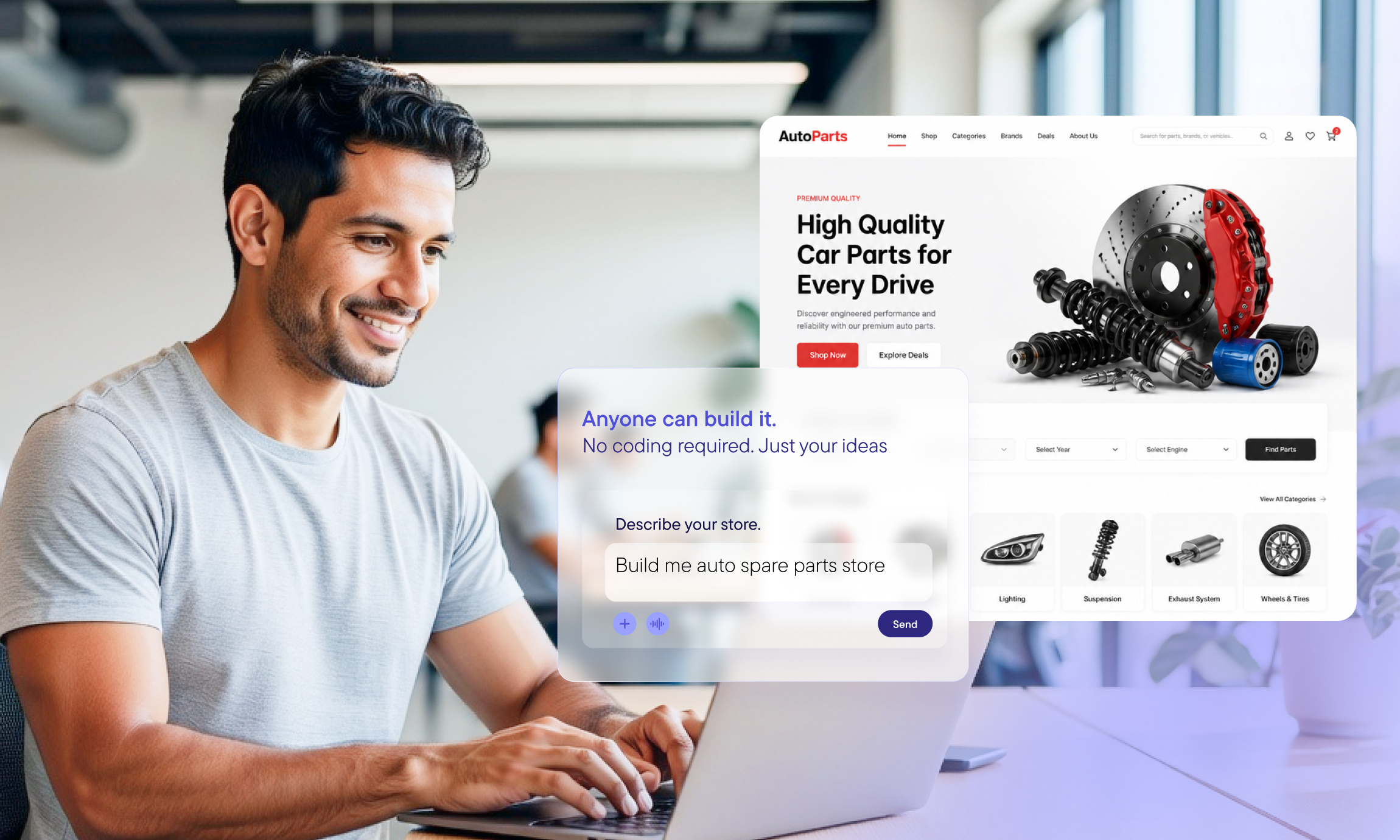

We have been leveraging AI in many shapes and forms for a while. Back in October 2024, fairly early in the RAG wave, we shipped a RAG-based AI Assistant right inside our documentation.
More recently, we gave it a major upgrade: A site-aware sidekick that floats alongside whatever page you are on, aware of what you are reading and ready to help you navigate, understand and implement commercetools. It grounded its answers in our live docs, so instead of the confident-but-wrong responses you get from a generic chatbot, you got answers tied to what the docs actually say: The right concepts, the correct setup steps and a link to the exact page each answer came from.
That solved a real problem: Getting trustworthy commercetools answers while you read the docs.
But builders, regardless if they’re developers, IT architects or even marketers, don’t spend most of their time browsing our technical documentation. They live in their editor, with an AI coding agent at their side. And the moment the agent leaves our docs site, it reverts to guessing.
So we asked the obvious next question: What if your agent carried that same grounded commercetools knowledge wherever you build?
That’s where the commercetools AI Plugins come into play.
Here’s the thing we learned the hard way: We gave coding agents access to our Knowledge MCP, a live, always-up-to-date connection to our documentation, GraphQL and OpenAPI schemas, query validation and best practices. And it worked. The agent stopped inventing fields. It stopped hallucinating endpoints borrowed from other commerce vendors. Ask it about the Carts API and it told you the truth.
And yet, when we asked it to build something real, such as “create a storefront with a working cart and checkout flow,” the result still required a lot of steering by a senior developer.
Why? Because knowing the APIs is not the same as knowing how to assemble them.
The agent had the facts. What it was missing was the patterns: The commercetools-specific patterns that experienced builders carry in their heads. How the pieces fit together into a storefront that’s structured correctly. That knowledge doesn’t live in any single API reference, but it does in the judgment of senior architects and builders.
So we captured it with Skills, where each one packages the implementation patterns for assembling the building blocks and surfaces them so a working agent can discover and reach for the right pattern exactly when it needs it. You get two things at once: The know-how to build it correctly, and a fast path to that know-how right inside the agent's loop.
The commercetools AI Plugins bundle three things and hand them to your agent in a single install:
commercetools Knowledge MCP: The facts. Live documentation search, GraphQL and OpenAPI schema lookup, query validation and best practices. Public endpoint, no API key needed. This is what stops the hallucinations and gives the agent the full breadth of commercetools knowledge, not just the slice a given Skill happens to cover.
commercetools Commerce MCP: The hands. This lets your agent interact directly with commercetools APIs via function calls, so it can go beyond explaining and actually perform the necessary work.
commercetools Skills: The judgment. These are the parts we’re most excited about. Skills are battle-tested playbooks the agent reaches for when it builds. They encode the implementation patterns for putting commercetools together properly: The storefront structure, the cart and checkout flows, the conventions a seasoned commercetools developer would reach for without thinking.
The Knowledge MCP makes sure your agent's facts are real. The Skills make sure the way it puts those facts together is right. Bundled together, your agent doesn't just answer like a commercetools expert; it builds like one.
None of this is a standalone gadget. The Plugins sit on top of the same knowledge foundation that already powers our docs AI Assistant: A continuously indexed Knowledge Base at the heart of everything we build for developer enablement.
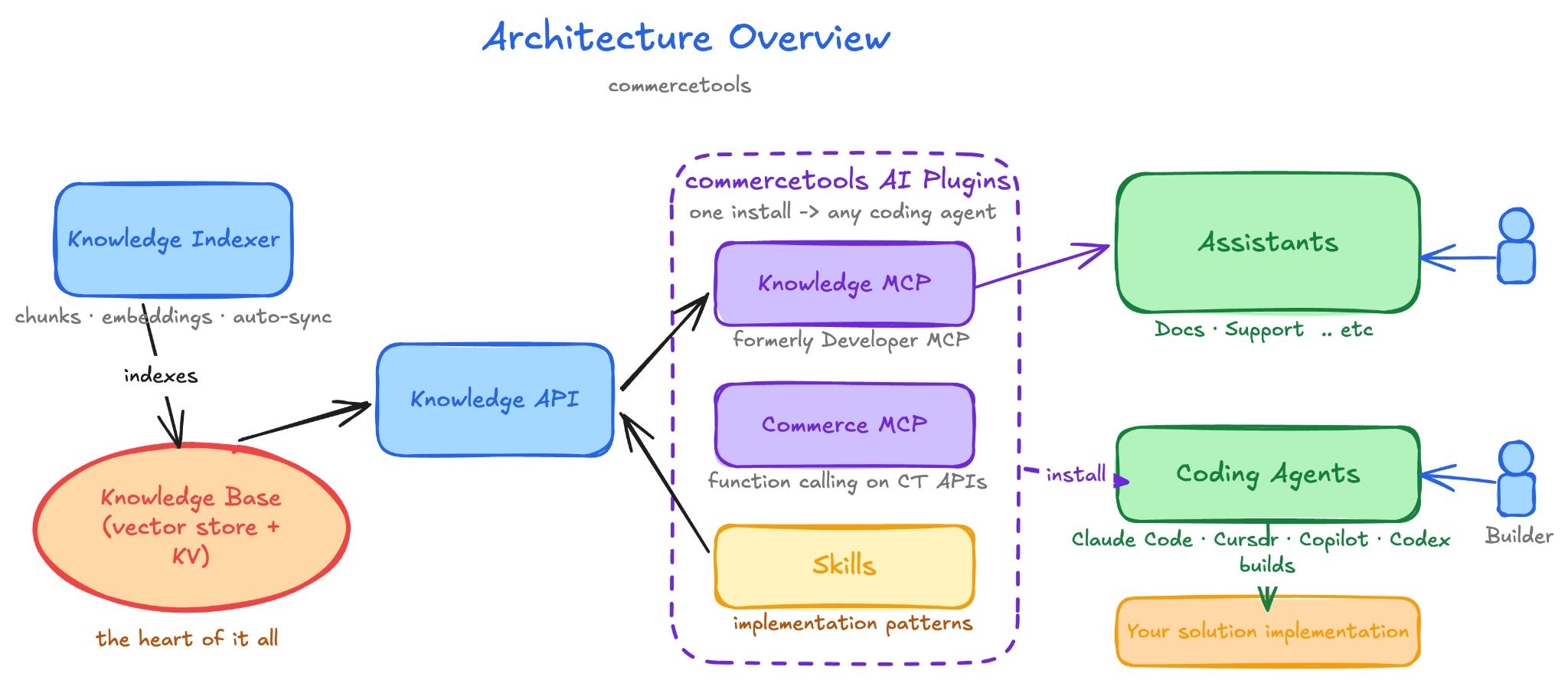
Read it left to right:
One install drops all three into your coding agent, which then builds against your commercetools project. That same Knowledge MCP also powers our own AI Assistants, so the knowledge your agent draws on is the knowledge we trust internally.
If you’ve been watching this space, you've seen the same move everywhere: “Make your agent smarter, just bolt on an MCP.”
We tried exactly that, and here’s our honest take: An MCP gives your agent better facts, not better judgment. Retrieval solves the “is this real?” problem. It does nothing for the “is this the right way to build it?” problem.
That second problem is the one that actually costs teams time: The naive structure that works in a demo and buckles in production, the integration that technically functions but ignores how commercetools is meant to be composed. You can’t retrieve your way out of it. You have to encode the patterns.
That’s the work behind the Skills, and it’s the reason these are plugins and not just another MCP endpoint.
Talk is cheap, so let us show you.
We built a Claude-powered agent harness that uses these plugins end-to-end. You hand it a single prompt. It reaches for the Knowledge MCP to get the facts right, leans on the Skills for the patterns, writes the storefront, and deploys it straight to Vercel so we can click on the finished result.
No copy-pasting docs. No hand-holding through the commercetools-specific gotchas. A prompt in, a deployed storefront out.
.gif)
Is it flawless? No. But it is a world apart from the same agent running without Skills, and the gap is not subtle. With the patterns in hand, it produces a coherent, properly structured storefront instead of a plausible-looking one. And it only gets better from here: every Skill we add and sharpen raises the floor on what the agent produces.
That's the difference between an agent that knows commercetools and one that can build with it.
Developers get an agent that writes commercetools code with the right field names, the right scopes, and the right structure, at the speed of autocomplete, without leaving the editor.
Solution architects get a faster path from a high-level requirement to a sound, end-to-end design, with the implementation patterns baked in rather than reconstructed from scratch each time.
In both cases, the goal is the same one we’ve been chasing all along: Put the knowledge your senior architects carry into every builder’s hands.
The plugins install in a single step in Claude Code, Cursor, VS Code Copilot and OpenAI Codex. The exact one-liner varies slightly by tool, and we keep them all up to date in one place, so rather than pasting commands that drift out of date, grab the latest from the docs.
The bundled Knowledge MCP is public and needs no API key to start exploring. Connecting the Commerce MCP to act on your own project takes a few credentials, and those setup steps live here.
Pro tip: Want just the implementation patterns and not the full plugin? You can install the Skills on their own. The how-to is in the docs, too.
After installing, ask your agent something real: “Use the commercetools Knowledge MCP to show me how to create a cart with a custom line item.”
It’ll reach out to the live docs and return the correct API call. When you ask for more, it starts building with the patterns a commercetools architect would use.
Ready to go bigger? This is close to the single prompt we hand our own harness to build the storefront demo above:
Build a production-ready B2C storefront connected to commercetools using the
new Product Search API. Include a home page, a product listing with facets,
product detail pages, a cart, checkout with the full payment flow, customer
authentication and registration, a search page with facets, and a wishlist.
With the plugins installed, the agent leans on the Skills to scaffold a sound architecture and on the Knowledge MCP to keep every API call correct, then builds it out.
Getting an agent to build and deploy a real storefront proved the point we set out to prove: Live knowledge (the Knowledge MCP), access to your project’s real data (the Commerce MCP), and captured implementation patterns (the Skills) together turn a capable coding agent into a capable commercetools builder. The combination works.
A storefront is just one use case, though, and there are many more: B2B flows, back-office automation, integrations and the long tail of things our customers build every day. Each has its own patterns worth capturing. So, treat what we’ve shipped today as the foundation, not the finish line. We’ll keep adding Skills and broadening what your agent can build as we learn alongside you.
We’ve grounded our AI Assistant on tech docs. Now we’ve grounded your agent, wherever you build. The plugins are open and free to start: Explore the repo, read the agentic builder tutorials, and tell us what you ship.
Happy building 🚀
Get started with commercetools for Builders and see for yourself how to stand up enterprise commerce in days, not months.

A guitarist at heart and an engineer by passion, Fady is an Engineering Manager and Tech Lead for a team that focuses on Innovation and Developer Experience, driving AI-powered solutions that improve workflows, boost creativity, and elevate the Developer Experience across organizations.
Receive monthly updates on trends, products and growth insights in your inbox.