

Get in touch
Stay informed
Receive monthly updates on trends, products and growth insights in your inbox.





I’ve built commerce platforms and point-of-sale systems, and I’ve sat through many enterprise architecture reviews for retailers. Some of those diagrams hurt your head: Dozens of boxes, hundreds of lines, and three or four boxes that all do the same job. When I ask why, the honest answer is usually “that’s the life we live in.”
I want to offer a simpler picture of what a unified commerce for enterprises should look like. Then I’ll take on the three concerns I hear most from CIOs — integration, data synchronization, and infrastructure costs — and answer them based on this ideal architecture.
Most retail leaders I speak to recognize the value of unified commerce from the customer’s side: Starting a purchase in one place and finishing it in another. There’s also an architectural value, and it’s simpler than CIOs expect.
A unified architecture has one authority for each commerce capability: One cart service, one catalog, one promotions engine and one pricing service. That doesn’t mean one vendor for everything. It means that for the logic that must be consistent across all channels, there’s exactly one place where the decision is made.
If you have two of any of those, you’re achieving unity by reconciling them. Two systems calculating promotions will round differently and handle stacked offers differently, and you pay to maintain the false consistency between them. That’s the expensive kind of integration, because you’re fixing a problem the architecture created.
The other kind of integration is healthy. Payment providers, ERP, tax, search and fulfillment are distinct capabilities, and you should choose the best option for each and connect them through a well-defined integration layer. That’s how a modern, composable architecture should work. The goal is not fewer systems. It’s no duplicated systems.
That’s the power of one: It also gives you a single system of record for orders and inventory commitments that feeds your financials. Fulfillment, warehousing and order management still decrement inventory in their own systems. But when several commerce systems commit against the same inventory pool (multiple POS systems, multiple eCommerce systems, the call center), you get over-commitments and underused stock. Inventory is the clearest example of how things go wrong when more than one system makes the promise.
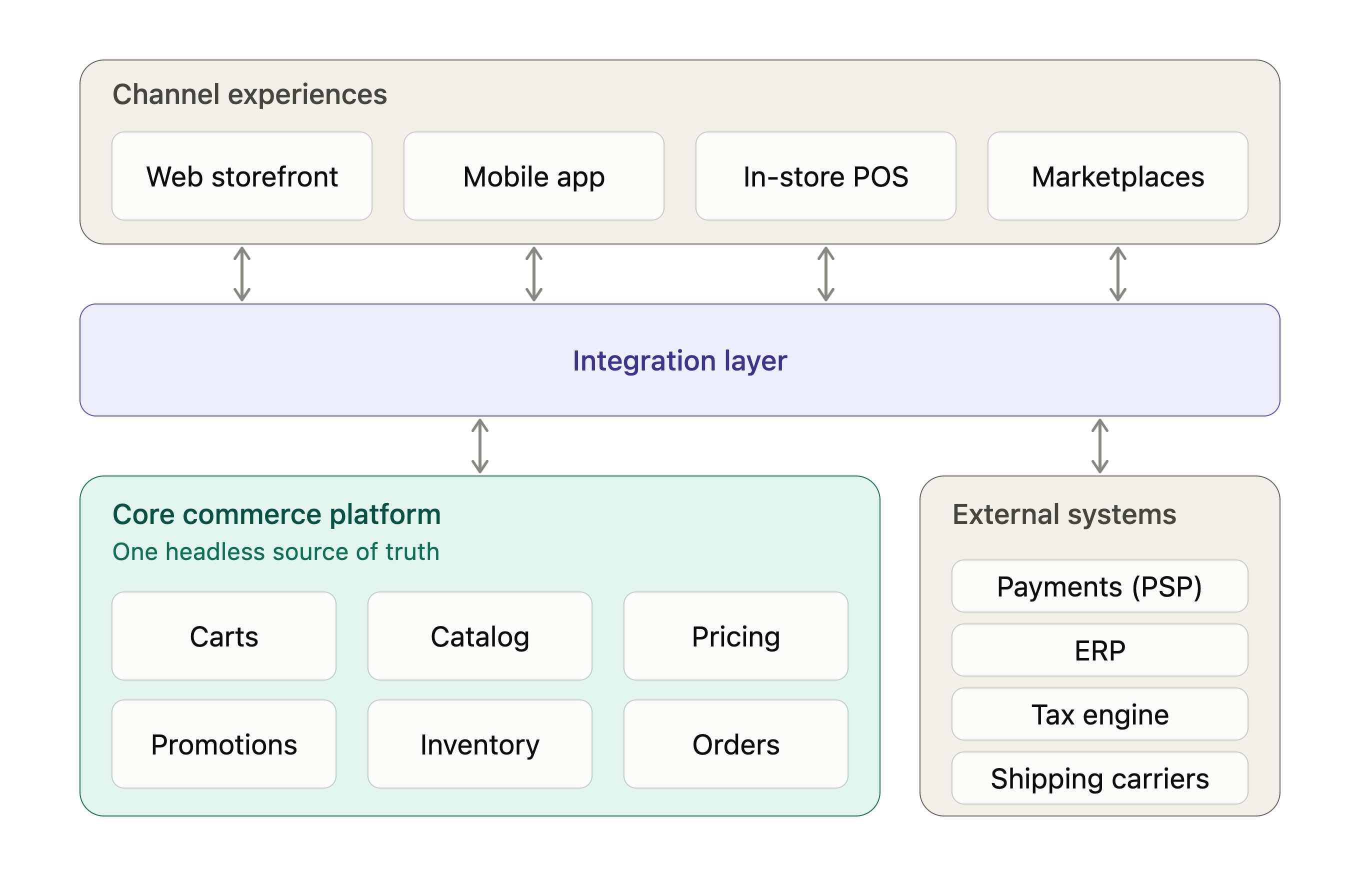
I’d like you to remember this diagram as three layers: User journeys on top, shared commerce services at the bottom, and integration in between. Every layer is modular. You can change an experience, swap a payment provider or add a new channel without touching the layers around it. It’s composed of:
The core has to be headless. A cart behaves differently in a storefront than at a store register, and that’s by design. Neither channel contains cart logic. Each one makes API calls to the same cart and presents the result in its own way. The business logic exists once, and each channel expresses it differently.
I like to think of a unified platform as a box of Legos. Each piece has a clear role, and you assemble what fits your business, whether that’s a boat, a castle or something nobody has imagined yet. Everything that should be pre-built is, but you aren’t locked into usage patterns that block a custom approach. Your business will change, so you need an architecture built for change, not just software with every feature you can think of today.
If you sell through more than one channel, you probably don’t have the architecture above. You have this one.
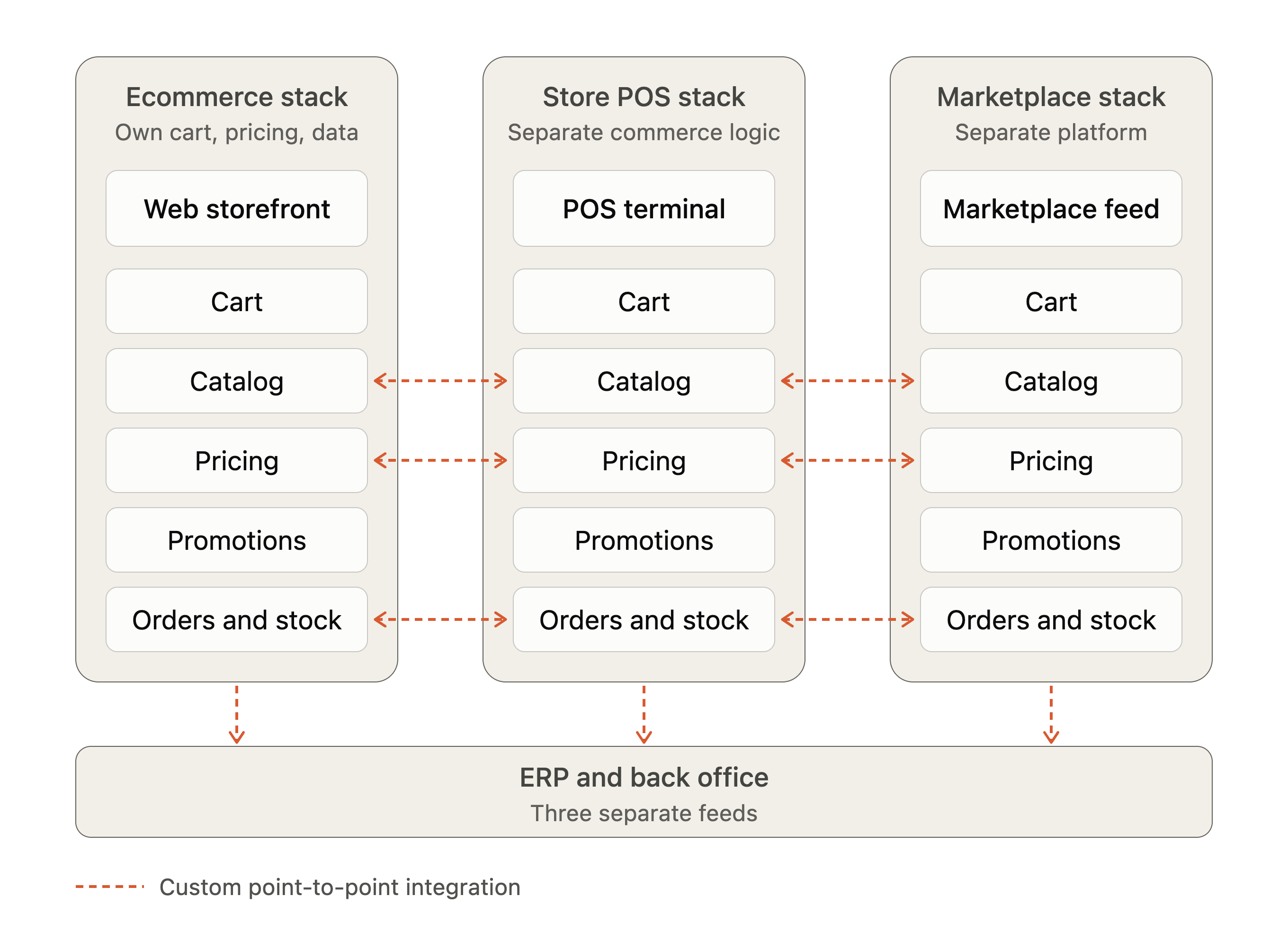
Your commerce stack supports online selling. Your POS supports in-store selling. Your call center supports phone orders. Each is a vertically integrated stack, each with its own cart, catalog, pricing, promotions and order handling. I’m not judging the quality of any of them. Because each channel is its own silo, with its own cart, catalog, pricing and promotions, a great deal of integration gets drawn between them. Each stack also connects separately to your ERP, product catalog, and payment systems, so you end up paying for redundant enterprise integration on top.
To support a journey that spans channels, such as buy online and return in-store, you have to hope the platforms can be orchestrated together, and then pay to make it happen. This is the expensive kind of integration, because you’re reconciling duplicated business logic after the fact.
The deeper problem is where you’re integrating. You’re connecting the experiences at the top while the commerce logic underneath stays disconnected. You can sync data like catalog and pricing, but you can’t sync algorithms like promotions and tax, so the gaps show up at the register.
It also limits how well you can adapt. Your business will change, and every change that crosses channels needs another integration point, if both platforms even support it. The architecture that looked consistent at launch becomes what slows you down. Each team is happy with its own platform, but cross-channel initiatives stall.
CIOs often ask whether they can keep their existing POS and just add an integration layer. In most cases, the answer is no, because a traditional POS is a black box. It owns its own cart, pricing, promotions, tax calculation and even login. It was built that way to be fast to implement without assuming external services were available. It wasn’t designed to delegate, so you can’t point it at an external cart or promotions engine.
A well-built modern POS may do better. It can integrate at the top, through screen flows and user experience, and at the bottom, through data movement. What it won’t give you is integration in the middle, where the business logic lives. That middle layer is what a unified platform provides.
Say an associate needs to check availability, add an item to the cart, and reserve stock. In a unified architecture, you build that multi-step process once in the integration layer as a single API call, and every channel uses it. With a siloed POS, you hard-code it in the POS, rebuild something similar in your commerce layer, pay twice, and then keep the two in sync.
Data can be synchronized well, and automation helps. Catalog, pricing and product descriptions are all data, so you can keep them consistent across systems. But syncing is never as good as everyone reading from a single source, because it introduces timing differences, and data can get lost along the way.
Business logic is harder, because you can’t sync an algorithm. Two promotion engines won’t calculate a stacked or conflicting promotion the same way, since they use different rules and different rounding. Your customer sees one price online and another at the register. Tax works the same way, and not every POS lets you delegate it to an external tax system.
So, treat them as separate problems. Synchronize what’s data. For what’s logic, don’t try to harmonize multiple engines. Have one.
Much of the work is also inside your own enterprise. One retailer we’re working with had product data split into two paths years ago: One enhanced for eCommerce, the other prepared for stores. Store catalog data is different, because you sell items there rather than browse them. You need barcodes, receipt wording and extra metadata. Their first job was to merge those paths into a single feed into the core catalog. That wasn’t a flaw in the architecture, but the undoing of a workaround the old architecture had forced on them.
I’ll keep this one short. Siloed stacks mean paying for the same things more than once: Databases, middleware and integration code for each stack, plus on-premises components in stores that someone has to patch and manage. A traditional POS is hardened and rock solid, but it’s a nightmare to operate for exactly that reason.
A unified architecture consolidates a lot of that. There’s one core platform instead of several overlapping ones, which means fewer databases and middleware licenses to maintain and less custom glue code to carry forward. Your integration work focuses on external systems, such as payments, ERP and tax, not on keeping duplicate commerce engines in agreement.
Two caveats. Moving to this model doesn’t make every cost disappear on day one. Some of the glue code you built around the old architecture has to be ripped out and redone, and you’ll be happier afterward, but there’s still real work to do until it’s done. And a unified architecture relies on wide-area networks, so you need a plan for when the network is unavailable.
Most CIOs don’t argue with the architecture. When I walk through it, they believe it. What they question is whether it really works. Why hasn’t someone done this before? The honest answer is that it wasn’t architecturally possible. You need an API-driven ecosystem, and twenty years ago it didn’t exist. Ten years ago it still wasn’t pervasive. Now the pieces are there.
Often the blockers are in the surrounding infrastructure. One retailer couldn’t move forward for a year because their payment provider had no in-store option, until we found a partnership that made it work. Another couldn’t get gift card data out of their old system and into a shared one. These have nothing to do with the unified architecture. They’re the legacy glue code that locked the old model in place.
There is one legitimate objection: Why would I put all my eggs in one basket? If the platform goes down, all your selling goes down. The answer is offline capability, and we’ve built it. Traditional POS systems have always run when the internet was down, and a unified architecture has to match that. Edge computing is the answer, and it’s part of the design.
You don’t need to replace everything at once. Start with the capability where your silos hurt most, often the catalog. Get a single path of product data flowing into the core, then move carts, pricing and promotions so every channel calls the same services. Put reusable composite logic in the integration layer so you build it once. Each step removes lines from your diagram.
One decision matters more than the rest. You can’t force-fit a closed POS into this architecture, so the first step is to stop buying a POS from one company and a commerce platform from another. Choose one commerce core that serves every channel and build any experience you like on top of it. As AI agents start working in stores and online, they’ll need the same consistent data and logic that shoppers and associates do, which is one more reason to have a single source.
Now lay your own enterprise diagram beside Figure 1. Count the boxes that do the same job and the lines that exist only to keep them in agreement. If you can’t explain why they’re there, it may be time to consider an alternative. How does yours compare? I’d love to know.
Get a demo
See the commercetools platform in action
Walk through the platform with our team and see how it fits your commerce goals.
Unified commerce architecture connects all sales channels through a shared commerce core. It centralizes key capabilities such as carts, catalog, pricing, promotions, inventory and orders, enabling consistent customer experiences across eCommerce, mobile, in-store POS and other channels.
Unified commerce reduces costs by eliminating duplicated commerce systems, databases, middleware licenses and custom integrations. Centralizing business logic also reduces maintenance effort and avoids the need to synchronize multiple systems that perform the same functions.
It depends on the POS system. Traditional POS platforms often operate as closed systems with their own carts, pricing and promotions engines, making deeper integration difficult. Modern POS solutions with API-driven capabilities offer greater flexibility to connect with shared commerce services.
Start by identifying duplicated commerce capabilities across channels. Establish a shared commerce core for carts, catalog, pricing, promotions, inventory and orders. Then introduce an API-driven integration layer to connect external systems such as ERP, payments, tax and fulfillment, before connecting customer-facing channels.

Technology executive with 30+ years in retail software, product strategy, and enterprise architecture. Cofounder of multiple companies focused on omnichannel and in-store solutions, with a track record of solving complex business challenges and driving retail innovation.
Receive monthly updates on trends, products and growth insights in your inbox.